
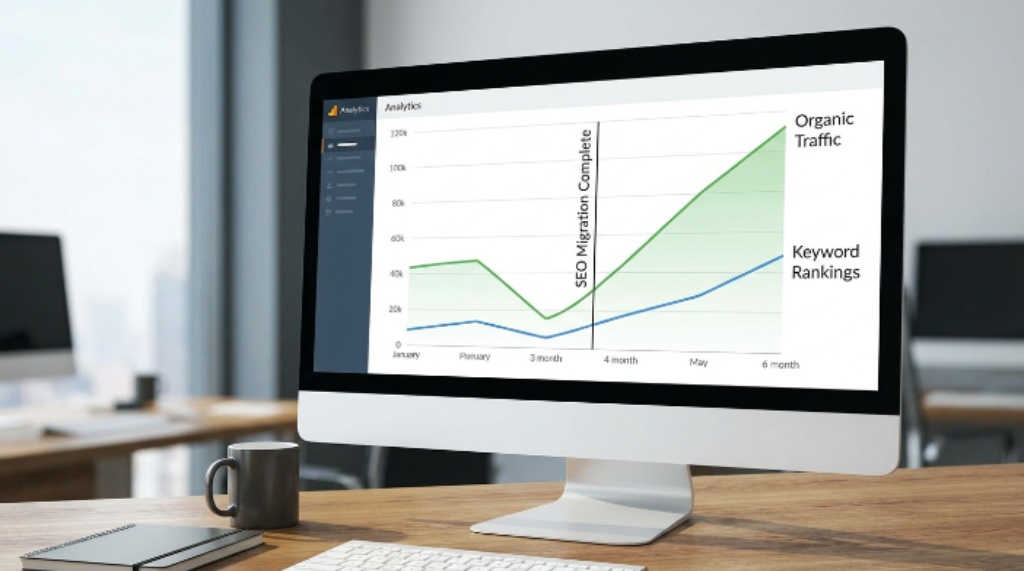
Moving a website is one of the most high-stakes tasks in digital marketing. Done well, it preserves everything you have built over months or years. Done poorly, it can wipe out your search visibility overnight. Rankings drop. Traffic falls. Indexed pages vanish from search results. Recovering from that damage takes time — sometimes a very long time.
The good news is that most migration problems are preventable. A clear plan, careful preparation, and close monitoring after launch make all the difference. This guide walks you through every stage of the process so you can move your site with confidence.
What Is an SEO Migration and When Does It Happen?
A website migration is any significant change to a site’s structure, URL format, domain, platform, or hosting. Not every redesign counts as a migration. However, when changes affect how search engines crawl, index, or understand your site, SEO is at risk.
Common migration scenarios include:
- Moving from HTTP to HTTPS
- Changing your domain name or brand
- Relaunching on a new CMS or platform
- Restructuring URL paths or site architecture
- Merging two or more websites into one
- Moving to a new hosting server or country-specific domain
Each of these scenarios carries different levels of risk. A domain change, for example, is far more complex than switching to HTTPS. Therefore, the level of preparation should match the scale of the change.
Why Migrations Go Wrong
Understanding the common failure points helps you avoid them. Most SEO losses during migrations come from a small set of avoidable mistakes.
| Common Mistake | Why It Hurts |
| No redirect plan | Old URLs return 404 errors; Google drops them from the index |
| Missing redirects for key pages | Link equity is lost; rankings collapse on those pages |
| Crawling blocked on staging | Issues go undetected before launch |
| Indexing blocked post-launch | Google cannot see the new site |
| No pre-migration benchmark | You cannot measure what was lost |
| Launching without monitoring | Problems go unnoticed for days or weeks |
Additionally, teams often underestimate how long Google takes to process large-scale changes. Even a well-executed migration can show temporary traffic dips as search engines re-crawl and re-evaluate the new structure.
Stage One: Audit and Document Everything Before You Touch Anything
The most important work happens before a single URL changes. You need a complete picture of your current site’s SEO health. This is your safety net.
Start by crawling your existing site with a tool like Screaming Frog, Sitebulb, or a similar crawler. Export every URL that currently exists. Then cross-reference that list with data from Google Search Console to identify which pages drive the most organic traffic and impressions.
Document the following for every important page:
- Full URL
- Page title and meta description
- Number of backlinks pointing to it
- Monthly organic traffic and clicks
- Current rankings for target keywords
- Index status in Google Search Console
This data becomes your migration map. Every high-value page needs a corresponding destination on the new site. No exceptions.
Additionally, export your internal link structure. Knowing how pages link to each other helps you rebuild that architecture correctly and avoid creating orphaned pages on the new site.
Stage Two: Build Your Redirect Map
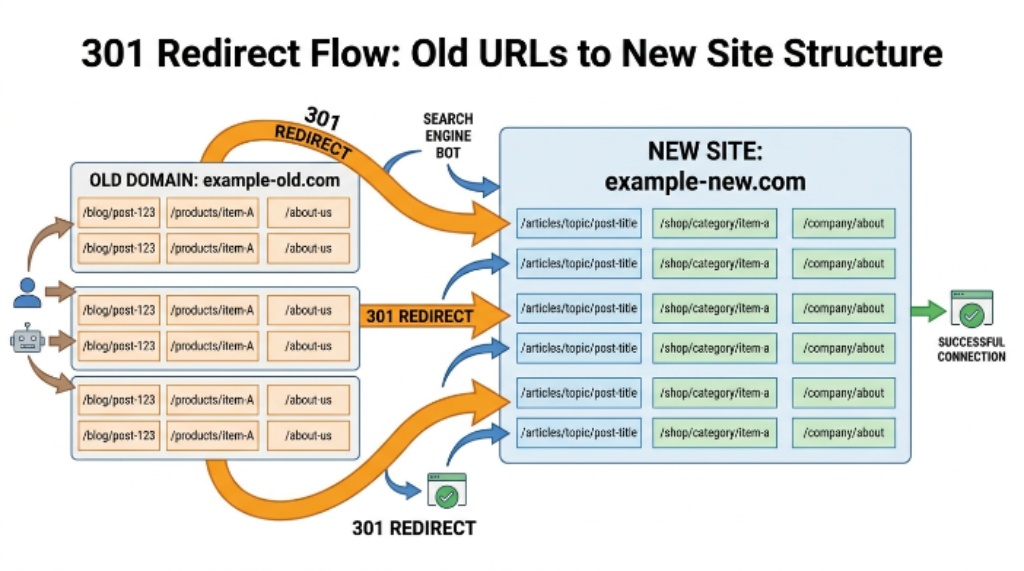
Redirects are the backbone of any migration. A 301 redirect tells search engines that a page has permanently moved to a new location. It passes the majority of link equity from the old URL to the new one. Without redirects, Google treats old URLs as broken pages and removes them from the index.
Your redirect map should cover every URL that will change during the migration. This includes:
- All pages that currently receive organic traffic
- All pages with external backlinks
- All pages indexed in Google Search Console
- Category and tag pages, if they rank
- Pagination URLs, if they receive traffic
| Old URL Status | Action Required |
| High traffic, high authority | 301 redirect to equivalent new page |
| Low traffic, no backlinks | 301 redirect to closest relevant page |
| Duplicate or thin content | 301 redirect to canonical version |
| No longer needed | 301 redirect to most relevant page or homepage |
| Already consolidated | No redirect needed if URL remains the same |
Avoid redirect chains wherever possible. A chain occurs when URL A redirects to URL B, which then redirects to URL C. Each hop in the chain reduces the amount of link equity that passes through. Map every redirect directly from old URL to final destination.
Stage Three: Prepare and Test on a Staging Environment
Never build or test a migration on a live site. Use a staging environment — a private copy of your new site — where you can check everything before it goes public.
On the staging site, make sure crawling is blocked. You do not want search engines indexing an unfinished version of your site before launch. A robots.txt disallow rule handles this during testing.
Run through the following checks on staging:
- Test every redirect in your redirect map manually and with a tool
- Confirm that page titles, meta descriptions, and canonical tags are correctly set
- Check that structured data carries over from the old site
- Verify that internal links point to new URLs, not old ones
- Check page speed and Core Web Vitals on the new platform
- Confirm that the XML sitemap reflects the new URL structure
Additionally, check your robots.txt file on the staging server. Ensure it is set to block crawlers. Many teams accidentally launch a site while the robots.txt file still blocks indexing from the production days.
Stage Four: Launch Day Checklist
Launch day requires a calm, systematic approach. Avoid launching on a Friday. If something goes wrong over a weekend, your ability to respond quickly is limited. Tuesday or Wednesday mornings are ideal — your team is fresh, and you have a full working week ahead to monitor and fix issues.
Work through this checklist on launch day:
- Confirm all redirects are live and returning 301 status codes
- Remove robots.txt blocks so search engines can crawl the new site
- Submit the new XML sitemap to Google Search Console
- Request indexing for your most important pages through Search Console
- Set up the new domain as a property in Google Search Console if the domain has changed
- Verify that Google Analytics continues to track sessions correctly
- Confirm that canonical tags point to the correct new URLs
Speed matters on launch day. The faster search engines find and process your new sitemap, the sooner the migration stabilizes.
Stage Five: Monitor Closely for 90 Days After Launch
The work does not end at launch. The post-migration monitoring period is just as important as the preparation phase. Search engines take time to re-crawl, re-index, and re-evaluate a migrated site. Temporary traffic dips are normal. However, sustained drops require immediate investigation.
Set up daily or weekly checks for the following metrics:
| Metric to Monitor | Where to Check | Warning Sign |
| Organic traffic | Google Analytics | Drop greater than 20% week-on-week |
| Crawl errors | Google Search Console | Spike in 404 or 500 errors |
| Index coverage | Google Search Console | Excluded pages increasing |
| Keyword rankings | Rank tracking tool | Sustained drops on key terms |
| Backlink status | Ahrefs or similar tool | Lost backlinks post-launch |
| Page speed | PageSpeed Insights | Core Web Vitals scores dropping |
If you spot a surge in 404 errors, return to your redirect map immediately. Some URLs may have been missed or incorrectly mapped. Fix those redirects as fast as possible to limit further ranking damage.
Additionally, check for any pages that have dropped out of the index unexpectedly. Sometimes canonical tags or noindex directives are accidentally applied to important pages during migration. Google Search Console’s coverage report surfaces these issues quickly.
How Long Does Recovery Take After an SEO Migration?
Recovery time depends on the scale and complexity of the migration. A small site that moves to HTTPS and maps all redirects correctly may see minimal impact within a few weeks. A large domain change involving thousands of pages typically takes three to six months for search engines to fully process.
| Migration Type | Typical Recovery Time |
| HTTP to HTTPS | 2 to 6 weeks |
| Platform change, same domain | 4 to 8 weeks |
| Domain name change | 3 to 6 months |
| Site merge or consolidation | 4 to 9 months |
| Full restructure with domain change | 6 to 12 months |
Therefore, set realistic expectations with stakeholders before the migration begins. A short-term dip does not always signal failure. Consistent monitoring and quick action on errors are the keys to a smooth recovery.
Tips for Preserving Link Equity During a Migration
Link equity is the ranking power that external websites pass to yours through backlinks. Migrations put this equity at risk if redirects are missing or broken.
Here are the most effective ways to protect it:
- Map every page with a backlink to a 301 redirect, even pages with low traffic
- Reach out to high-authority sites that link to your top pages and ask them to update the link to the new URL
- Update your internal links to point directly to new URLs rather than relying on redirects
- Monitor your backlink profile after launch and flag any links pointing to old URLs that now return 404 errors
Additionally, avoid noindexing pages temporarily during migration unless you are certain they should not appear in search results. A noindex tag applied by mistake can remove a high-ranking page from Google within days.
Conclusion
A well-planned SEO migration protects your rankings, traffic, and indexed pages through every stage of the process. The key is preparation. Auditing your current site, building a thorough redirect map, testing everything on staging, and monitoring closely after launch gives you the best possible outcome. Temporary dips are normal and expected. However, with the right processes in place, recovery is faster and the long-term impact is minimal. Treat every stage of the migration as equally important — because it is.
Frequently Asked Questions
How long does an SEO migration take to plan properly?
The planning phase depends on site size. A small site with under 500 pages may take two to four weeks to prepare. A large enterprise site with thousands of URLs can require two to three months of preparation before launch day. Rushing the planning phase is the most common cause of migration failures.
Do 301 redirects pass full link equity to the new URL?
301 redirects pass the majority of link equity, but not always 100 percent. Google has stated that well-implemented 301 redirects pass most of the ranking signal. However, redirect chains reduce the amount of equity passed at each hop. Always redirect old URLs directly to the final destination.
Should I tell Google about my migration before it happens?
You cannot formally notify Google before a migration. However, submitting your new XML sitemap through Google Search Console immediately after launch helps Google discover and process the new URLs faster. If you are changing domains, the domain change tool in Search Console assists with signaling the move.
What should I do if traffic drops significantly after a migration?
First, check Google Search Console for crawl errors and index coverage issues. A spike in 404 errors usually means redirects are missing or broken. Check that your robots.txt file is not accidentally blocking crawlers, and confirm that no important pages carry a noindex directive. Fix issues in order of traffic impact, starting with your highest-value pages.
Is it safe to change the URL structure and domain at the same time?
It is technically possible, but it is not recommended. Changing both the domain and URL structure simultaneously doubles the complexity and doubles the risk. Where possible, separate these changes into two distinct migrations. Complete one fully and allow it to stabilize before making the second change.