

Hey founder! Just launched your first website? That’s awesome – you’ve taken a huge step toward building your online presence. But here’s the million-dollar question: can Google actually find your beautiful new site? Because if your website isn’t SEO-friendly, it’s essentially like putting up a stunning billboard in the middle of the desert where nobody will ever see it.
The harsh reality is that 75% of users never scroll past the first page of search results. If your website isn’t optimized for search engines, you’re missing out on massive organic traffic potential. But don’t worry – incorporating SEO into your website design doesn’t have to be overwhelming or require a computer science degree.
What Is SEO and Why Does Website Design Matter?
Search Engine Optimization (SEO) is simply the practice of optimizing your website so it shows up when people search for relevant terms on Google, Bing, and other search engines. Think of it as making your website speak Google’s language fluently.
Most beginners make the mistake of treating SEO as an afterthought – something to worry about after the site is built. But here’s the thing: effective SEO starts with smart website design decisions. When you build SEO considerations into your site’s foundation from day one, you’re setting yourself up for long-term search visibility success.
The connection between website design and SEO runs deeper than many realize. Search engines evaluate hundreds of ranking factors, and many of them are directly tied to how your site is designed, structured, and coded. Everything from your site’s loading speed to its mobile responsiveness affects your search rankings.
Foundation Elements: Building an SEO-Friendly Website Structure
Clean URL Structure
Your website’s URL structure is like the address system for your online property. Clean, descriptive URLs help both search engines and users understand what each page contains.
Instead of messy URLs like yoursite.com/page1?id=123&category=xyz, aim for clean, readable URLs like yoursite.com/affordable-website-design or yoursite.com/small-business-seo-tips. This approach makes your URLs more likely to get clicked and easier for search engines to index.
Keep your URLs short, descriptive, and include your target keywords naturally. Avoid using numbers, special characters, or overly complex folder structures that confuse both users and search crawlers.
Website Loading Speed Optimization
Page speed is a confirmed Google ranking factor, and it directly impacts user experience. Studies show that 40% of visitors will abandon a website if it takes more than 3 seconds to load. That’s potential customers walking away before they even see what you offer.
To optimize your site’s loading speed, start by choosing a reliable web hosting provider. Compress your images using tools like TinyPNG or built-in compression features. Minimize HTTP requests by combining CSS and JavaScript files where possible. Enable browser caching so returning visitors experience faster load times.
Consider using a Content Delivery Network (CDN) to serve your content from servers closer to your visitors’ geographic locations. These technical optimizations might sound complex, but most modern website builders and content management systems offer plugins or built-in tools to handle these automatically.
Mobile-First Responsive Design
With mobile devices accounting for over 60% of web traffic, having a mobile-responsive website isn’t optional – it’s essential. Google uses mobile-first indexing, meaning it primarily uses the mobile version of your site for ranking and indexing.
Responsive design ensures your website looks and functions perfectly on smartphones, tablets, and desktop computers. This means readable text without zooming, easy-to-tap buttons, and intuitive navigation regardless of screen size.
Test your website on multiple devices and screen sizes. Pay attention to how forms display on mobile, whether your navigation menu is easily accessible, and if your content remains readable without horizontal scrolling.
Intuitive Navigation and Site Architecture
Good website navigation serves both users and search engines. A logical site structure helps search engine crawlers understand your content hierarchy and discover all your important pages.
Create a clear navigation menu with descriptive labels. Use breadcrumb navigation to show users and search engines the path to any given page. Implement internal linking strategies that connect related content and distribute page authority throughout your site.
Consider creating an XML sitemap that lists all your important pages for search engines. Most SEO plugins can generate this automatically, but understanding its purpose helps you make better structural decisions.

Content Strategy: Speaking Your Audience’s Language
Keyword Research and Natural Integration
Forget about keyword stuffing – those days are long gone. Modern SEO focuses on understanding search intent and creating content that genuinely helps users find what they’re looking for.
Start by researching the actual words and phrases your target audience uses when searching. Tools like Google’s Keyword Planner, Ubersuggest, or even Google’s autocomplete suggestions can reveal valuable insights about search behavior.
Instead of targeting generic terms like “innovative solutions” (which nobody actually searches for), focus on specific, actionable phrases like “affordable website design for small businesses” or “how to optimize website loading speed.” These long-tail keywords often have less competition and higher conversion rates.
Creating Valuable, User-Focused Content
Search engines reward websites that provide genuine value to users. This means creating content that answers questions, solves problems, or provides useful information related to your business niche.
Write in a conversational tone that matches how your audience communicates. Use headers and subheaders to organize your content logically. Include examples, case studies, or step-by-step instructions that make your content actionable.
Remember that search engines are getting better at understanding context and user intent. Focus on thoroughly covering topics rather than hitting arbitrary word counts or keyword densities.
Local SEO Considerations
If you serve customers in specific geographic areas, local SEO should be integral to your website design. Include your location information consistently across your site. Create location-specific landing pages if you serve multiple areas.
Claim and optimize your Google My Business profile. Encourage customer reviews and respond to them professionally. Include local keywords naturally in your content, such as “Denver web design services” or “Los Angeles restaurant marketing.”
Technical SEO Implementation
Image Optimization Best Practices
Images can significantly impact your site’s loading speed and SEO performance. Compress all images before uploading them to your website. Use descriptive file names instead of generic names like “IMG_001.jpg” – try “small-business-website-design-tips.jpg” instead.
Always include alt text for your images. Alt text helps search engines understand what your images contain and improves accessibility for users with visual impairments. Write descriptive alt text that includes relevant keywords naturally, but avoid keyword stuffing.
Choose the right image format for each use case. JPEG works well for photographs, PNG for graphics with transparency, and WebP for modern browsers seeking optimal compression.
Meta Tags and Schema Markup
Title tags and meta descriptions are your website’s first impression in search results. Craft compelling title tags that include your target keywords and accurately describe each page’s content. Keep titles under 60 characters to avoid truncation in search results.
Write engaging meta descriptions that encourage clicks while incorporating relevant keywords. Although meta descriptions don’t directly impact rankings, they influence click-through rates, which can indirectly affect your search performance.
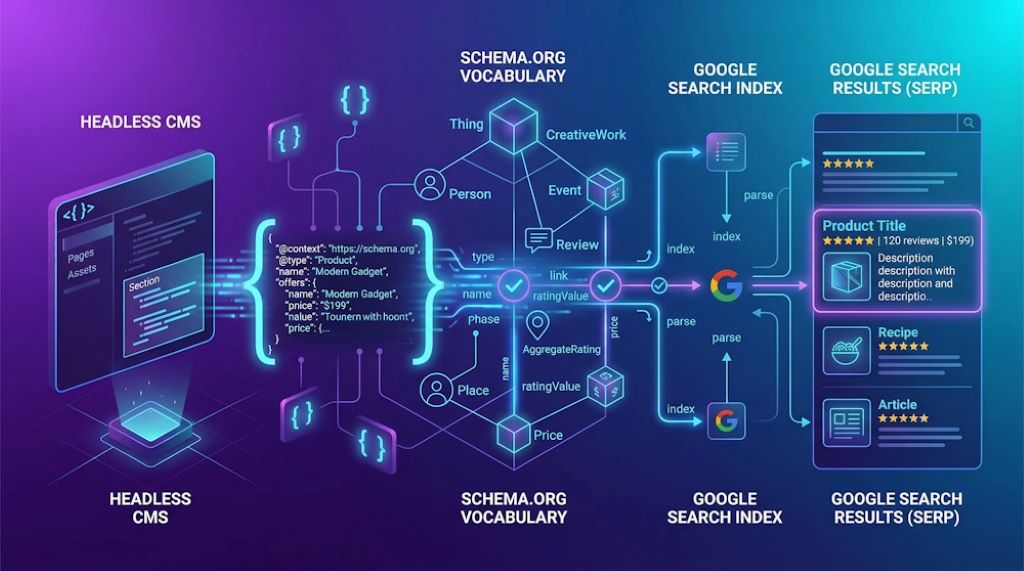
Consider implementing schema markup to help search engines understand your content better. Schema can enhance your search listings with rich snippets, potentially increasing click-through rates.
Website Security and HTTPS
Website security is both a ranking factor and a trust signal for users. Implement HTTPS encryption across your entire website. Most web hosts offer free SSL certificates, making this security measure accessible for all website owners.
Keep your website’s software, plugins, and themes updated to protect against security vulnerabilities. Regular security maintenance not only protects your site but also maintains user trust and search engine confidence.
Measuring SEO Success
Essential SEO Metrics to Track
Set up Google Analytics and Google Search Console to monitor your website’s SEO performance. Track organic traffic growth, keyword rankings, and click-through rates from search results.
Monitor your website’s loading speed regularly using tools like Google PageSpeed Insights. Keep an eye on mobile usability issues that might affect your search performance.
Track conversions from organic search traffic to understand which SEO efforts drive actual business results, not just vanity metrics.
Common SEO Mistakes to Avoid
Don’t neglect your website’s technical foundation in favor of content creation. Both elements work together to create SEO success. Avoid duplicate content issues by ensuring each page serves a unique purpose and provides distinct value.
Don’t ignore mobile optimization or assume your desktop site automatically works well on mobile devices. Test regularly and make adjustments as needed.
Avoid buying backlinks or participating in link schemes. Focus on earning quality backlinks through valuable content and genuine relationship building.
Frequently Asked Questions
How long does it take to see SEO results from website design changes?
SEO is a long-term strategy, and results typically become visible within 3-6 months of implementing changes. However, technical improvements like faster loading speeds can impact user experience immediately, which may lead to better engagement metrics that search engines notice sooner.
Can I do SEO myself, or do I need to hire a professional?
Many basic SEO practices can be implemented by website owners themselves, especially with modern website builders and SEO plugins that automate technical aspects. However, competitive industries or complex websites may benefit from professional SEO expertise.
How important is website design compared to content for SEO?
Both website design and content are crucial for SEO success. Good design ensures search engines can crawl and index your content effectively, while quality content provides the value that earns rankings. They work together synergistically.
What’s the biggest SEO mistake new website owners make?
The most common mistake is treating SEO as an afterthought rather than building it into the website’s foundation. This often results in expensive redesigns or missed opportunities for organic traffic growth.
How do I know if my website design is SEO-friendly?
Use free tools like Google PageSpeed Insights, Mobile-Friendly Test, and Search Console to evaluate your site’s SEO health. Look for fast loading speeds, mobile responsiveness, clean URLs, and proper heading structure.
Take Action: Start Building Your SEO-Friendly Website Today
Building an SEO-friendly website doesn’t require expensive tools or years of technical training. Start with the fundamentals: clean structure, fast loading speeds, mobile responsiveness, and valuable content that speaks your audience’s language.
Remember, SEO is a marathon, not a sprint. Focus on creating a solid foundation with good website design practices, then consistently add valuable content that serves your audience’s needs. The organic traffic growth will follow.
Ready to transform your website into a traffic-generating machine? Start by auditing your current site against the checklist provided in this guide. Identify the areas that need improvement and tackle them one by one. Your future self (and your business) will thank you for investing in proper SEO from the beginning.
Don’t let your beautiful website remain hidden in the digital desert. Implement these SEO-friendly design strategies and start attracting the organic traffic your business deserves.
Related Topics:
SEO Myths vs. Reality: The Truth About Modern Search Engine Optimization
 We are a team of professional’s experienced in inbound marketing and paid marketing, conversion rate optimization and growth hacking that we love what we do.