
Are you tired of creating content that doesn’t rank or running Google Ads that drain your budget without delivering results? The secret weapon successful digital marketers use isn’t a mystery—it’s strategic keyword research. With over 8.5 billion searches happening on Google daily, finding the right keywords can be the difference between your content being discovered by millions or remaining buried in the digital graveyard of page two.
Google Keyword Planner stands as one of the most powerful and accessible tools for keyword research, offering invaluable insights directly from the world’s largest search engine. Whether you’re optimizing your website for organic search or planning your next Google Ads campaign, mastering this free tool can transform your digital marketing strategy and drive measurable results.
What is Google Keyword Planner?
Google Keyword Planner is a free keyword research tool designed primarily for Google Ads advertisers, but it’s equally valuable for SEO professionals and content creators. This comprehensive platform provides search volume data, keyword suggestions, competition levels, and bid estimates directly from Google’s vast database of search queries.
The tool serves as your gateway to understanding what your target audience is actually searching for, helping you bridge the gap between what you think people want and what they’re genuinely looking for online. By leveraging Google’s own data, you gain access to the most accurate and up-to-date keyword intelligence available.
Setting Up Google Keyword Planner
Getting Started
To access Google Keyword Planner, you’ll need a Google Ads account. Don’t worry—you don’t need to run active campaigns or spend money to use the keyword research features. Simply visit ads.google.com and create an account using your existing Google credentials.
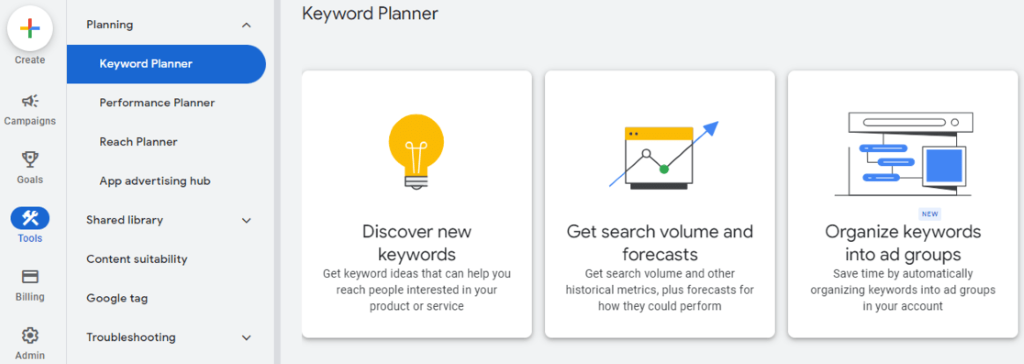
Once your account is set up, navigate to the “Tools & Settings” menu in the top right corner, then select “Keyword Planner” under the “Planning” section. You’ll be presented with two main options: “Discover new keywords” and “Get search volume and forecasts.”
Account Verification
While basic access is free, Google provides more detailed data to verified accounts with active campaigns. However, even without running ads, you can access valuable keyword insights including search trends, related keywords, and competition levels.
Step-by-Step Keyword Research Process
Step 1: Discover New Keywords
Start by clicking “Discover new keywords” and enter your seed keywords, website URL, or competitor URLs. Seed keywords are the foundation terms related to your business, products, or services. For example, if you run a fitness blog, your seed keywords might include “weight loss,” “home workouts,” or “nutrition tips.”
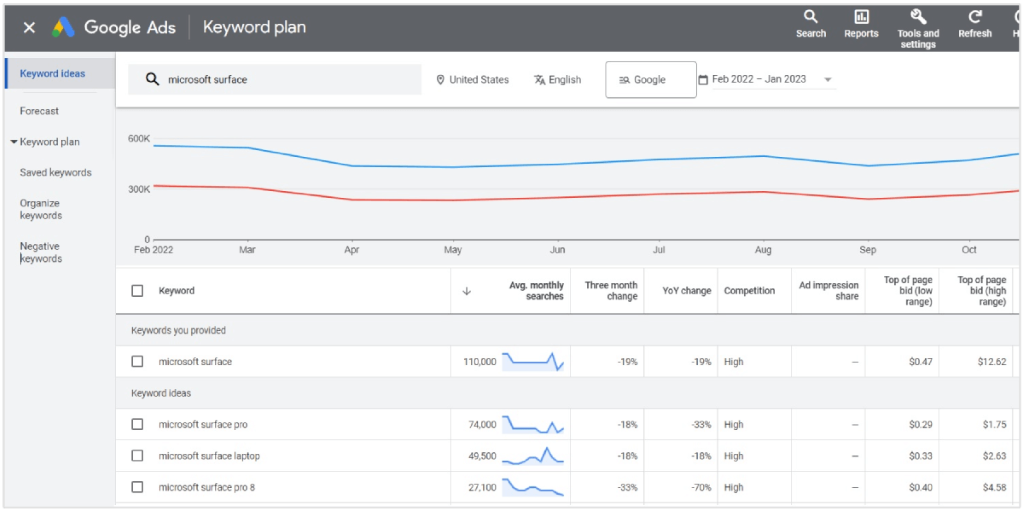
The tool will generate hundreds of keyword suggestions based on your input, complete with average monthly search volumes, competition levels, and suggested bid ranges. Pay attention to the keyword variations and long-tail phrases that emerge—these often represent untapped opportunities with lower competition.
Step 2: Analyze Search Volume and Trends
Search volume indicates how many people search for a particular keyword each month. However, don’t automatically gravitate toward high-volume keywords. Instead, look for the sweet spot between search volume and competition level. Medium-volume keywords with low to moderate competition often provide better opportunities for ranking and converting.
Use the historical metrics feature to identify seasonal trends and search patterns. This information helps you plan content calendars and adjust campaign timing for maximum impact.
Step 3: Evaluate Keyword Competition
The competition column shows how many advertisers are bidding on each keyword. For SEO purposes, this gives you insight into commercial intent and market saturation. High competition keywords often indicate strong commercial value but may be more difficult to rank for organically.
Look for keywords with medium competition levels—these typically offer good search volume with manageable ranking difficulty. Long-tail keywords frequently fall into this category and often have higher conversion rates due to their specific nature.
Step 4: Understand Search Intent
Modern SEO success depends heavily on understanding search intent—the reason behind a user’s query. Google Keyword Planner helps identify intent through keyword variations and related terms. Look for patterns in the suggested keywords:
- Informational intent: Keywords including “how to,” “what is,” “guide,” or “tips”
- Commercial intent: Terms with “best,” “review,” “compare,” or “vs”
- Transactional intent: Keywords containing “buy,” “price,” “discount,” or “near me”
Aligning your content with search intent significantly improves your chances of ranking and converting visitors into customers.
Advanced Keyword Research Strategies
Geographic Targeting
Use the location settings to research keywords specific to your target markets. Local businesses can discover region-specific search terms and adjust their SEO strategy accordingly. This feature is particularly valuable for understanding how language and search behavior vary across different geographic areas.
Seasonal Keyword Planning
Leverage historical data to identify seasonal keyword opportunities. Plan content and campaigns around predictable search volume spikes, giving you a competitive advantage when demand peaks.
Competitor Analysis
Enter competitor URLs to uncover keywords they’re targeting. This reverse-engineering approach reveals gaps in your keyword strategy and identifies new opportunities you might have overlooked.
Negative Keywords for Ads
When planning Google Ads campaigns, use Keyword Planner to identify negative keywords—terms you don’t want your ads to appear for. This improves ad relevance and reduces wasted spend on irrelevant clicks.
Organizing and Implementing Your Keyword Research
Creating Keyword Lists
Export your keyword research into spreadsheets for better organization. Group keywords by themes, search intent, or campaign objectives. This systematic approach makes it easier to create targeted content and ad groups.
Content Mapping
Map keywords to specific pages or pieces of content on your website. Focus on one primary keyword per page while incorporating related secondary keywords naturally throughout your content.
Tracking Performance
Implement tracking mechanisms to monitor how your chosen keywords perform over time. Use Google Analytics and Search Console to measure organic traffic, rankings, and conversion rates for your target keywords.
Common Mistakes to Avoid
Keyword Stuffing
Resist the temptation to overuse keywords in your content. Modern search algorithms prioritize natural language and user experience over keyword density. Focus on creating valuable content that naturally incorporates your target keywords.
Ignoring Long-Tail Keywords
Long-tail keywords may have lower search volumes, but they often convert better due to their specificity. A user searching for “best wireless bluetooth headphones under $100” has much clearer intent than someone searching for just “headphones.”
Focusing Only on High-Volume Keywords
High search volume doesn’t always translate to better results. Consider the competition level, relevance to your business, and conversion potential when selecting keywords.
Maximizing SEO and Google Ads Performance
SEO Optimization
Incorporate your researched keywords into page titles, meta descriptions, header tags, and throughout your content naturally. Create comprehensive content that addresses user intent and provides genuine value.
Google Ads Strategy
Use keyword research to build tightly themed ad groups with relevant keywords. This improves Quality Score, reduces cost-per-click, and increases ad performance. Match keyword intent with appropriate landing pages for better conversion rates.
Content Strategy Integration
Let keyword research guide your content calendar. Create content around keywords with growing search trends, and address common questions revealed through your research.
Measuring Success and Refining Strategy
Key Performance Indicators
Track important metrics including organic traffic growth, keyword rankings, click-through rates, and conversion rates. These indicators help you understand which keywords drive the most valuable traffic to your website.
Continuous Optimization
Keyword research isn’t a one-time activity. Search trends evolve, new competitors emerge, and user behavior changes. Regularly revisit your keyword strategy and adjust based on performance data and market changes.
Testing and Iteration
Experiment with different keyword variations and content approaches. A/B test ad copy and landing pages to optimize for your highest-value keywords.
Frequently Asked Questions
How often should I conduct keyword research?
Perform comprehensive keyword research quarterly, with monthly check-ins to identify trending keywords and seasonal opportunities. Major algorithm updates or significant business changes may warrant additional research sessions.
Can I use Google Keyword Planner without running Google Ads?
Yes, you can access Google Keyword Planner with a free Google Ads account without running active campaigns. However, detailed search volume data is more readily available to accounts with active ad spend.
What’s the difference between short-tail and long-tail keywords?
Short-tail keywords are broad, 1-2 word terms with high search volume and competition (like “shoes”). Long-tail keywords are specific, 3+ word phrases with lower volume but higher conversion potential (like “women’s running shoes size 8”).
How do I know if a keyword is too competitive?
Analyze the search results for your target keyword. If the first page is dominated by large, established websites with high domain authority, the keyword may be too competitive for newer or smaller websites to rank for effectively.
Should I target the same keywords for SEO and Google Ads?
Not necessarily. Use high-competition, high-value keywords for Google Ads where you can bid for immediate visibility, while focusing SEO efforts on medium-competition keywords where you can realistically rank organically.
Take Action Today: Transform Your Digital Marketing Strategy
Ready to unlock the full potential of your online presence? Start by implementing the keyword research strategies outlined in this guide. Begin with Google Keyword Planner today—it’s free, powerful, and waiting to reveal the exact terms your customers are using to find businesses like yours.
Don’t let another day pass wondering if your content will reach its intended audience. Take control of your digital marketing strategy with data-driven keyword research. Your future self—and your bottom line—will thank you for making this investment in understanding your audience’s search behavior.
Start your keyword research journey now and watch as targeted traffic, higher rankings, and increased conversions transform your online success story.
Related Topics:
How SEO, AEO, GEO, AIO & SXO Are Shaping Digital Marketing
 We are a team of professional’s experienced in inbound marketing and paid marketing, conversion rate optimization and growth hacking that we love what we do.